
Release 1.60
Updated
Welcome to Sardius Control Panel Release 1.60
Released November 2, 2026
Channel Creation
Creating new channels just got a lot easier! The creation wizard has been completely redesigned from the ground up with an experience that reacts to exactly what you need, when you need it.
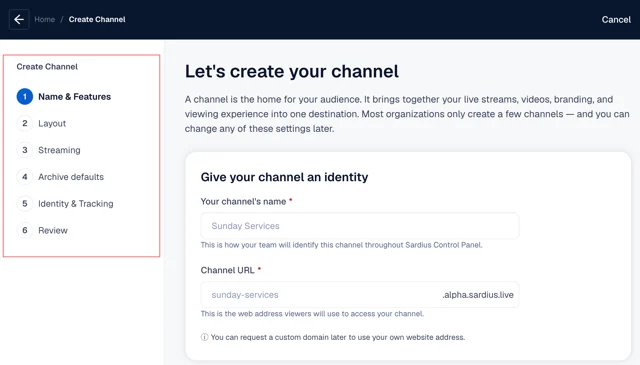
- Steps depend on your starting locations.
- Plan to live stream? You'll get the full creation experience.
- Need password protection? Create the gate and the main experience at the same time, and not redo your setup later.
- Creating a VOD experience only? Skip setup steps relating to live streaming and archiving.
- Layout options depend on your starting decisions. Live Streaming offers layouts like Slate and Player-only layouts. Adding Video Library unlocks Collection, or the option to add content to an existing Slate channel when one exists.
- Streaming uses devices, outputs, and templates already configured on the account. This removes extra steps after creation, allowing you to start streaming once channel setup is complete.
- Channel Branding & Identity has often been an overlooked channel feature, and helps you get the most of your streaming experience.
Learn more about Channel Creation here.
Sardius AI Curator
Our latest product in the Sardius AI Suite has some minor updates based on your initial feedback:
- Widget Layout — The search bar, overview, and suggestion chips now use the full width of the embed. "Was this helpful?" now sits under the answer. On wide windows, scripture stays in a column beside the answer.
- Curator in Custom Roles — Backend access to Curator Embeds and Insights can now be granted to account users with custom roles.
- Allowed Websites Validation — The allowlist now rejects entries that aren't valid domains.
- Answer Accuracy & Grounding (Testing) — Fixes three issues: speaker names falling back to "the speaker," an incorrect "no new content" warning, and reworded questions being matched too literally.
Collection
Our most popular Video On Demand channel layout has received some small adjustments including:
- Single Hero Slide — Fixes the empty gap on the right of the Hero banner when only one asset is added.
- Albums on the HomePage — Album rows now list existing albums in the dropdown, matching how Categories and Series already work.
- Header Link Alignment — A new toggle, on by default, controls whether the last header link sits beside My Account. Turning it off keeps navigation on the left and puts Search beside the profile.
- Assets Grid Defaults — New grids default to 4 items per row and a 200px minimum card width, so they no longer collapse into a single column. Existing overrides still apply.
- Assets Grid Slider Arrows — Slider Arrow settings are hidden from Assets Grid, since they never applied there.
Learn more about Collection here.
Advanced SimLive
Our team has addressed an issue where Youtube and Facebook outputs sound choppy during an Advanced SimLive stream. This update also shortens turn around time for livestreams to allow for more stable playback.
Player Updates
The Player Editor now has an audio-only toggle. When enabled, the player will use an audio-only source and show only the asset's thumbnail in the player. This feature works for muxed and unmuxed streams.
Learn more about the Player Editor here.
Other Improvements
- Login Layouts and Chat - Password-only layouts no longer sign every viewer in as one shared user, which had caused chat to show the same display name for everyone. The password is now checked on the server and unlocks a viewer segment in guest mode.
- Login Layout Fonts — Login Layout now uses the same Google and Typekit font integration as Collection, so users type a font name instead of pasting a font URL.
- Image Gallery Search Toggle — On AI Discover accounts, users can now switch from AI search to standard Title/PID search in the Image Gallery, for example when adding images to Bios.
- Chat Pinned Messages — Unpinning a message, or pinning a new one in its place, no longer deletes the original from Chat.
- Transcript Tab on Audio Assets — The Transcript tab now appears on assets containing only audio files.
- Usage Panel Viewers — Fixed the New Viewers count in the usage panel, which was inaccurately reporting newly created viewers each month.