
YouTube API Output Errors
Updated
This article covers common YouTube API Output errors in the Sardius Control Panel — including invalid access tokens, title issues, missing privacy status, and stream binding conflicts.
If your YouTube API Output is unable to connect during a live event, this means that an error was encountered by our system. An explanation for each error, as well as steps to repair, are below.
Error validating access token
The YouTube Channel you are attempting to stream to no longer has permission to connect. This occurs whenever there is a change to the user's YouTube account who set up the YouTube API output. Examples include, but not limited to:
- Changing your Google password
- Changing your Google/YouTube privacy settings
- Changing the user's YouTube permissions level
- Removing the user's ability to manage the YouTube Channel
In order to work again, the output will need to be reauthenticated, which is a fancy way of saying, you may need to sign in again.
In order to Reauthenticate, simply navigate to the Outputs area of the Control Panel and select the YouTube output that won't connect. As the new window opens for the Output, click the three stacked dots on the top right and then select Reauthenticate from the drop down.
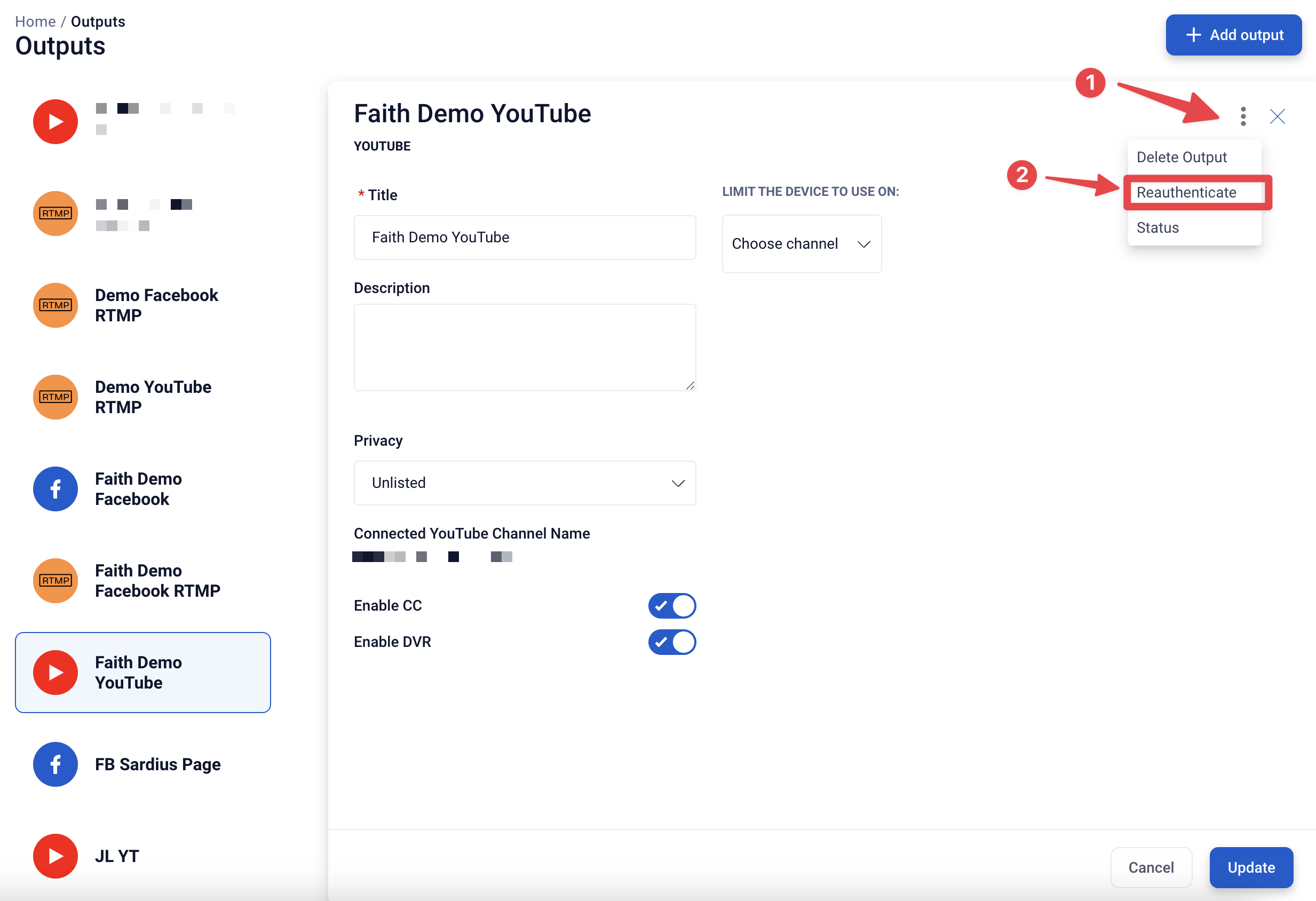
From there, simply log into your YouTube/Google account like normal. When you go back to your event, you can click the button to start the stream for the Output.
Note: If the output was created by an user who no longer is a part of your organization or manages your YouTube Channel, you will have to create a new YouTube API output.
Cannot reuse running output due to lack of id
Your YouTube API output is unable to start because it is already in use. This is likely due to an improper event shutdown during a previous live stream.
To turn off this running output and clear the error, contact Sardius support.
Title is Invalid
Your event title has more than 100 characters, or contains unusual characters (such as < and >). YouTube only allows titles with 100 characters or less, and unusual characters can cause issues with our API scripting, which will result in YouTube choosing not to create the event.
To bypass this, remove any unusual characters and reduce the amount of characters in your Event's title on the Sardius Calendar to 100 or fewer. After saving the changes, wait about 30-60 seconds. Then you will be able to relaunch the YouTube output successfully.
Error Message: Invalid value at ‘resource.status.privacy_status’
Your YouTube API output is unable to start because the output's privacy status is not set. Navigate to your outputs library and add a privacy status (Public, Private, or Unlisted) to the output.
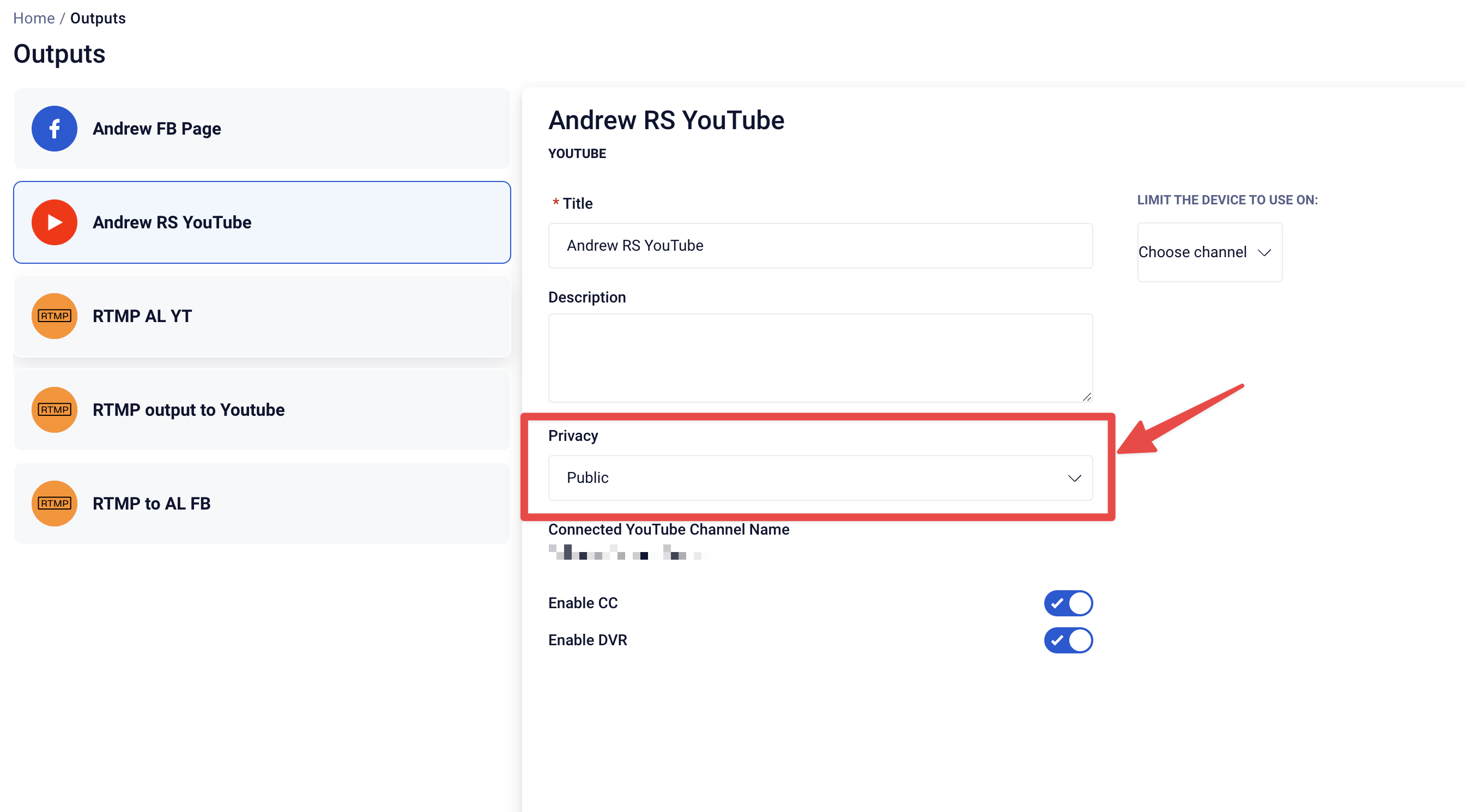
Then return to your Channel and start the output.
Binding is not allowed
Your YouTube API output is unable to start because it's trying to reuse a stream key that YouTube has already closed out. This typically happens when the same stream key is used for more than one YouTube event around the same time — for example, a secondary or test stream goes live and ends before your main event starts, so YouTube rejects the binding for the second event.
To resolve this, and to prevent it from happening again:
- Set up a separate YouTube API output for secondary or one-off streams so they don't share a stream key with your regular event.
- If your channel creates YouTube events in advance (e.g. a 2-day notice window), consider turning that off if you have other streams scheduled too close to your main event.
Still Not Working?
If you have completed the above processes, and you have not found a resolution, please contact Sardius Support for further assistance.