Curator Insights
Updated
Insights shows you what people asked and how well your library answered them, account-wide. For what your library actually contains, independent of who asked what, see Curator Understanding. (The full distinction between the two is covered in What is Curator?
Real questions, from real searches, grounded in what you taught. Not a chatbot report.
Why this page exists
Insights is for the people who own the teaching: discipleship, communications, media. You see what landed. You see what didn't. You see what to clip, strengthen, or teach next.
Questions while you set this up: support@sardius.media.
Getting oriented
What you're looking at
Every search in the embed is a signal. Someone cared enough to type.
Insights gathers those searches so you can see impact without sitting next to every visitor. It looks at which themes keep coming up, which titles already answer them, which moments are worth a 30-second clip, and where the library falls short.
Empty charts mean nobody has asked yet — see After you paste to test it.
Filters
| Control | What you use it for |
|---|---|
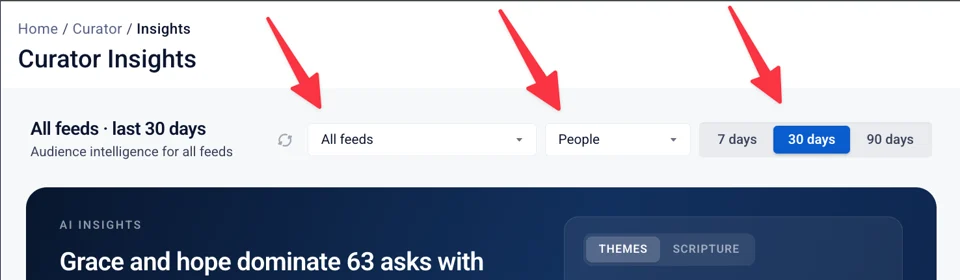
| Feed | One embed, or all of them. Useful when a campus widget and a main-site widget should not be mixed. |
| People / Apps / All | A dropdown. People = questions typed in the widget. Apps = connected apps, such as a Bible app. All = both. Start with People. |
| 7 / 30 / 90 days | Default is 30. Use 7 when you just launched. Use 90 when you want the slower story. |
| Refresh | The circular icon next to the feed picker. Reloads the numbers without wiping the layout. |
The brief and the numbers
AI Insights
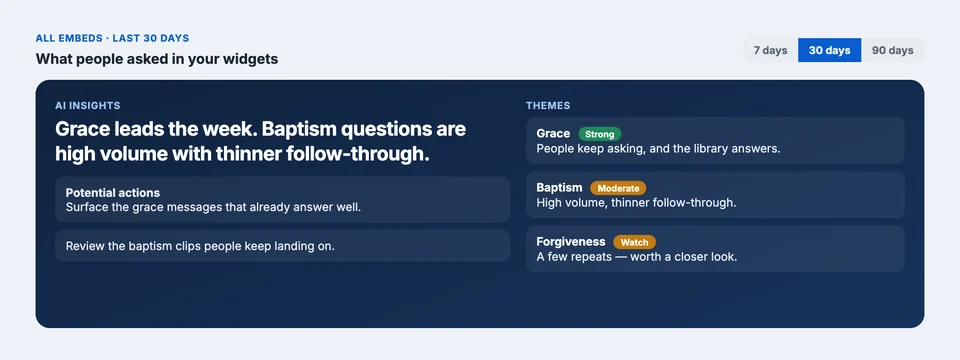
The navy block is the brief. A headline, a short list of potential actions, and themes on the right.
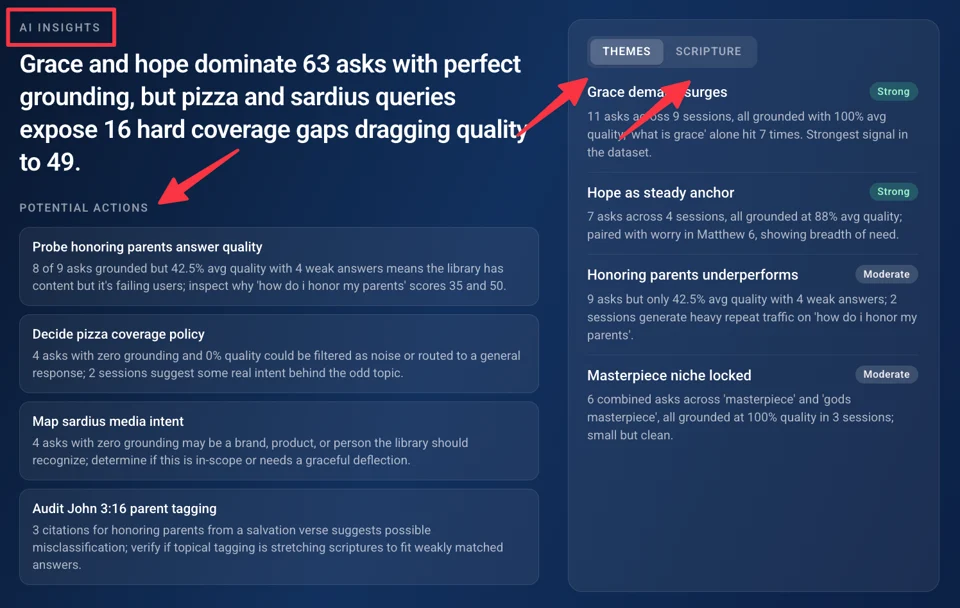
This is the "so what." You should not have to reverse-engineer a chart to know that "grace" is carrying the week, or that baptism questions are not turning into watch time.
- Potential actions — things a media or discipleship lead can actually do: surface a workhorse title, inspect a weak answer, fix a tracking gap.
- Themes — Strong / Moderate / Weak. A theme is a cluster of asks that mean the same thing, even if the wording differs.
- Scripture — only when Bible references are on for the library. Off, and you just see Themes.
The first time a brief loads, it can take up to a minute to generate. While it's working, you'll see a placeholder version of the layout — faint blocks where the headline, actions, and themes will land — instead of a spinning loader. (This is sometimes called a "skeleton screen": it shows you the shape of what's coming before the content fills in.)
Once it's ready, the footer at the bottom tells you two things: when this version was generated, and when you'll be able to pull a fresh one.
If you do refresh, the brief you're currently looking at doesn't disappear while the new one loads — it stays on screen until the update finishes, so you're never left staring at an empty panel.
The numbers
Below the brief sit five tiles, each showing one metric at a glance. Next to each number is a delta — the change compared to the previous period of the same length. So if you're looking at the last 30 days, that delta is measured against the 30 days before that, not a fixed baseline.
Spam and junk stay out of this strip when that filter is on. A yellow "Filtered noise" note appears when invalid asks were excluded. They do not pollute audience intelligence.
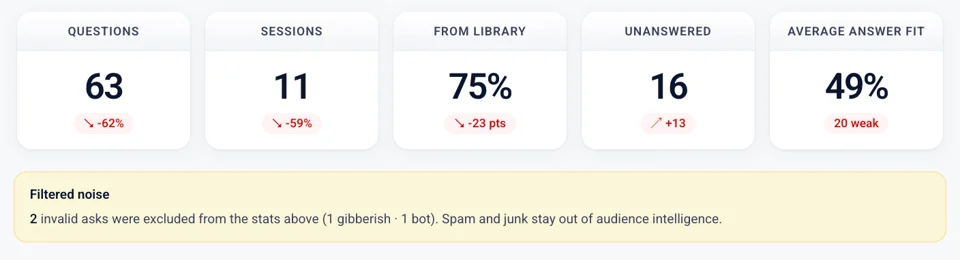
| Tile | What it tells you |
|---|---|
| Questions | How many times someone asked. |
| Sessions | How many of those asks turned into a watch session — not just an answer card. |
| From library | Share of asks that got a grounded answer from your media. This is the "not a chatbot" number. |
| Unanswered | Asks with no good library match. Those are the next teaching opportunities. |
| Average answer fit | How closely the cited moment matched the question. A "1 weak" chip means one answer scored as a soft miss. |
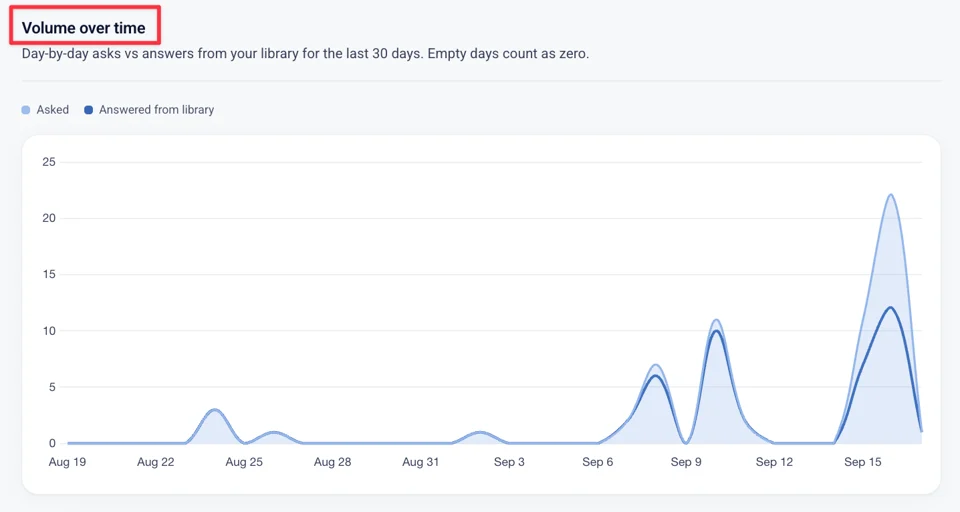
Volume over time
Day-by-day asks vs answers from your library. Empty days count as zero. Hover a day for the exact counts.
Use this to see whether a Sunday, a campaign, or a new embed actually moved search — not just pageviews.
Engagement and content performance
Engagement
This section tracks what happens after someone asks: how many questions got answered from your library, how many turned into actual watching (play events), and when and where those asks are coming from.
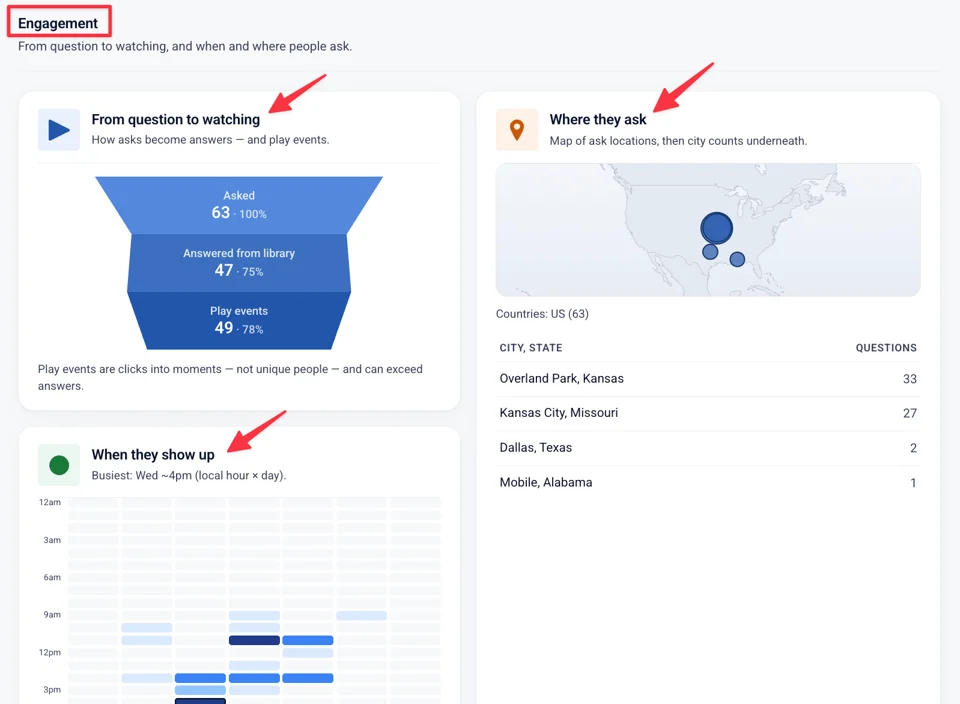
From question to watching. A funnel: Asked → Answered from library → Play events. Play events are clicks into moments, not unique people.
A high "from library" with a thin play layer means people got an answer and did not press play. That is a clip problem, or a title problem, not a search problem.
When they show up. A week × hour heatmap in local time, plus a bar chart of asks by hour. The product calls out the busiest slot — for example Tuesday around 10am.
Staff already know when the service is. This tells you when people go looking afterward.
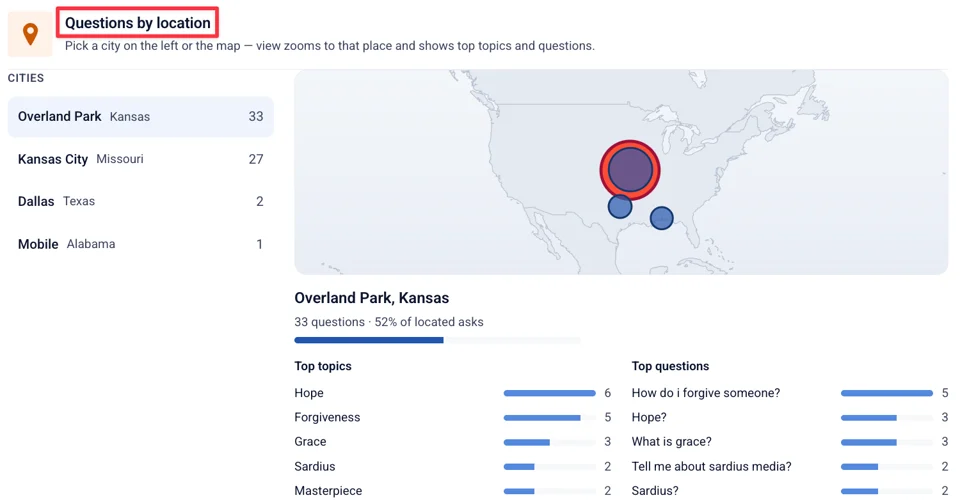
Where they ask. A map and a city list. Click a city and the view zooms: question count, share of located asks, and the top topics in that place.
Useful when you have more than one campus, or when a widget is on a national site.
Library intelligence
What's working hard in your content — moments to clip, and titles that power answers.
Clip candidates. Most-cited moments. Each row is a timestamp, the question that hit it, a citation count, and a 30-second clip action. Click the row to open it in the Clipping tool.
This is the "exact minute" made practical. If nine people asked "what is grace about?" and landed at 1:18:30, that is a clip you already earned.
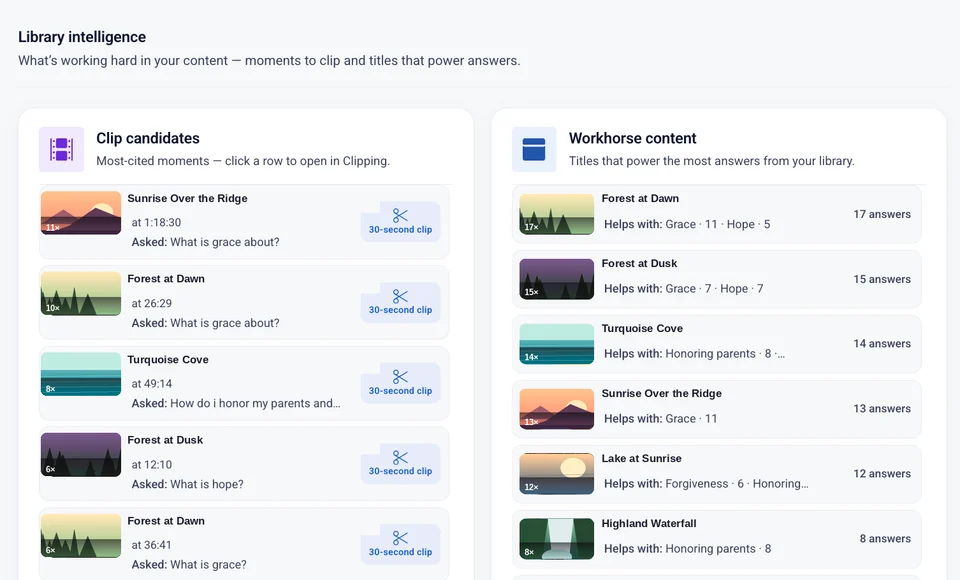
Workhorse content. Titles that power the most answers. Each row shows how many answers it carried, and which theme it helps with.
These are the messages that should stay easy to find. Feature them on the home shelf. Do not bury them.
What they ask about
Topics group asks by meaning. Paraphrases share a theme. Categories are a coarser client taxonomy when you have one — not the same field as themes.
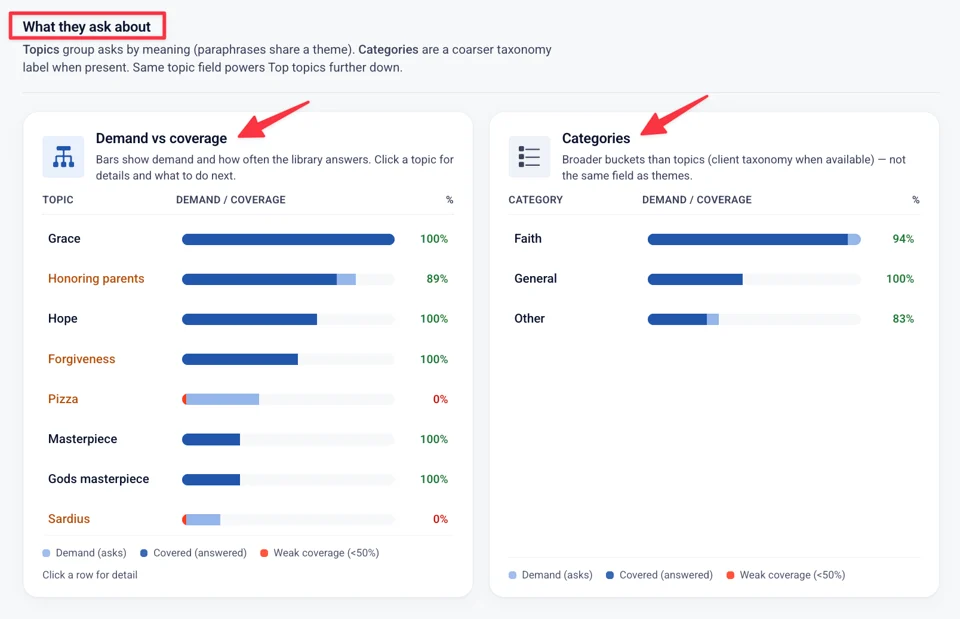
Demand vs coverage. Bars show how often people asked, and how often the library answered. Click a row.
- Well covered — demand is there and the library is answering it. Keep publishing in that area. Consider featuring top moments as clips.
- Soft miss — you answered, but some answers scored as a weak fit. Strengthen or replace the content being cited so the next ask lands cleanly.
- Weak coverage — fewer than half the asks on this topic got answered. That points to one of two things: either your library doesn't have strong material on it yet (a teaching gap), or the material exists but something's keeping it from surfacing — it's muted, or match quality is tuned too strict to find it.
Questions & opportunities.
Exact wording. Top questions by volume. Top topics with the same field as Demand vs coverage. Click a row to reveal tags and related asks.
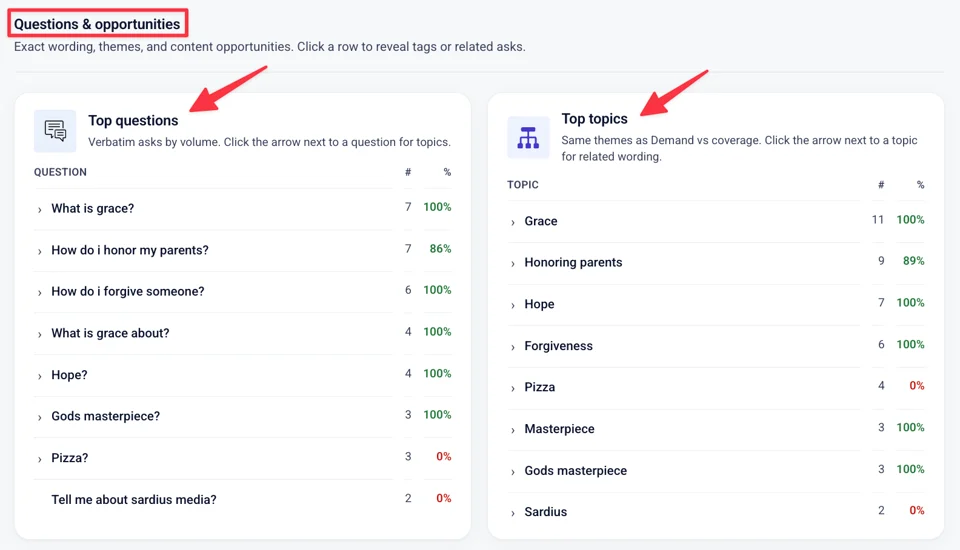
This is the discipleship list. Not "what we hoped they would ask." What they typed.
Gaps and feedback
Where the library may fall short — from the AI Insights brief, and from the raw asks.
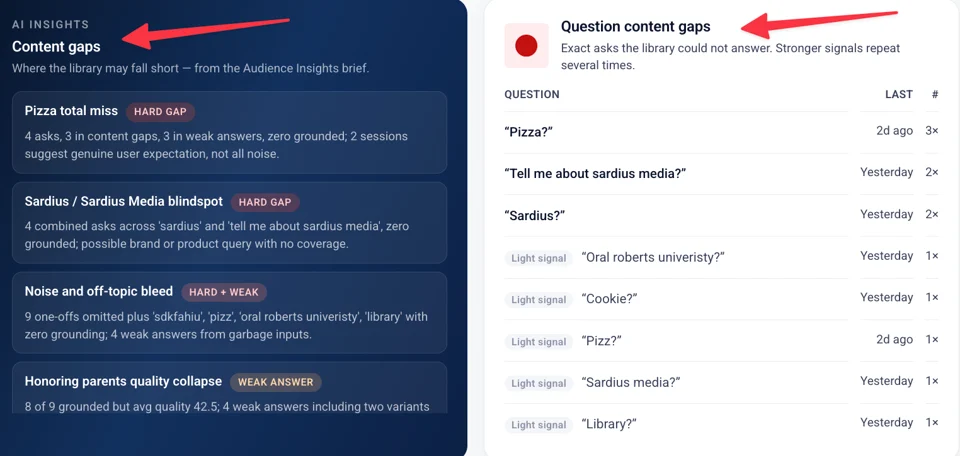
- Content gaps — narrative from the brief (hard gap, weak answer). Read these as operator notes, not as a grade.
- Question content gaps — exact asks the library could not answer. Stronger when they repeat.
- Weak answers — answered, but scored under 60. Soft misses. Better content for these, not more search.
- Topic content gaps — themes with weak coverage or repeated unanswered asks.
Audience and feedback
Questions by location
Pick a city — from the list on the left, or by clicking its marker on the map — and the panel below zooms in on that place: how many questions came from there, and what people actually asked.
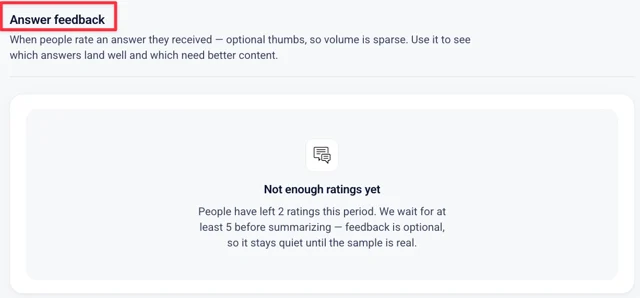
Answer feedback
Leaving thumbs (feedback) on the widget are optional, so most visitors won't bother leaving one — a low count here isn't a bug, it's just how many people chose to click.
Because of that, the page won't show a summary until it has at least 5 ratings in the selected window. That floor is intentional: showing you a percentage built from 2 or 3 clicks would read like a real survey result, when it's really just a couple of people.