
Add an Album
Updated
An Album is functionally identical to a Series — a themed, time-boxed grouping of assets — but it's the convention used for audio-only content, like a music collection or a podcast season. If your content is video, use a Series instead; use an Album only when "Album" is genuinely the more natural term for your audience.
Adding an Album
1. To add a Album, locate the Album link on the sidebar. It can be found under “Metadata.”
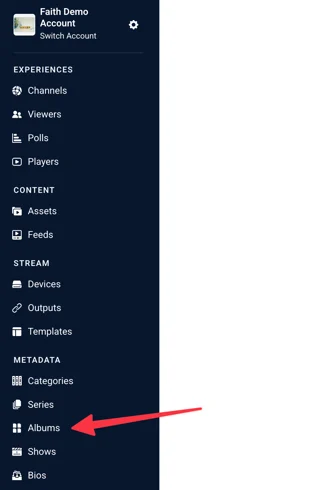
2. In the upper right corner, click on “Add Album”

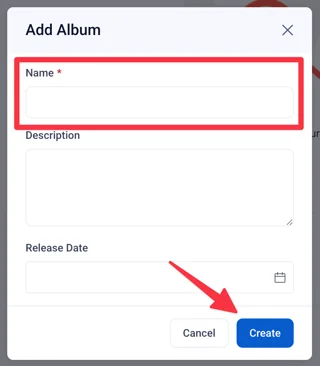
A modal will appear. Enter in the following information:
- Name: A name for the album. This field is required.
- Description: Create a description of the album. This description can let other users or viewers know that this album is for.
- Release Date: Enter in a release date for the album, if one applies.
When you have finished entering the above information, click “Create.”
Editing Album Metadata
The Album form uses the same fields as Categories and Series:
- Name: Required, up to 100 characters.
- Release Date: The Album's release or start date, if relevant.
- Subtitle: Optional short line.
- Images: Click Add Image to upload artwork for this album. See Recommended Image Sizes for Collection Layout for the image sizes used here.
- Description: Full description shown on the Album page.
- Short Description: Condensed version for cards and previews.
- Album Tags: A multi-select field for tagging the Album itself — separate from the Tags you apply to individual assets. Use this to make the Album discoverable in searches or filters that key off Album-level metadata.
- Album Artists: A multi-select field linking Bios to this Album — musicians, contributors, speakers, or hosts, depending on your content. Collection uses shared, generic field names across different types of content, so this field may still be labeled "Artists" or "Category Artists" in the interface regardless of what your team calls them.
- Approved: Toggle. An unapproved Album won't display on your site.
Album vs. Series — the only real difference
There is no structural difference between a Series and an Album — both are single-select per asset (an asset can have one Series or one Album, never both, and never more than one of either). The only distinction is which one better matches how your audience talks about your content. Most Collection sites use Series for everything and never touch Albums at all.