
What is Curator?
More in AI CuratorYou’re on: What is Curator?
Ask a real question. Get a cited answer from what they actually said. Not a chatbot.
This article covers what Curator is, what your account needs to use it, and how its pieces — feeds, embeds, your website, and Insights — fit together. For step-by-step instructions, see Create a Curator Embed, Curator Advanced Settings, Curator Embed Management, Curator Insights, and Curator Understanding.
What Curator is
Curator lets visitors ask a question and get an answer from your own videos, cited to the exact second. It builds on the foundation of AI Discover: Discover processes your library so it can be searched, and Curator uses that to answer questions. If the library never covered a topic, Curator says so instead of making something up.
The teaching is already there. Now anyone can find the moment — on your site, in an embed.
Two companion pages come with it: Insights, where leadership sees what people actually asked, and Understanding, where you see what the library itself actually contains.
Questions while you set this up: support@sardius.media
Before you start
To use Curator, your account needs:
- AI Discover — processes your videos so Curator can search them. Discover Basic is enough.
- Sardius AI Tokens — power Curator's answers. Each answered question uses tokens from your account's monthly allowance, which is shared with other Sardius AI features.
Curator can only answer from videos AI Discover has finished processing. New videos become searchable once processing is done.
To add Curator, add Deep Understanding, or change your token allowance, contact your Sardius Account Manager.
Tracking token usage: Click the Settings gear next to your account name, then Usage. Under AI Usage, the AI Create and Curator (Tokens) tab shows how many tokens your account has used. See Understanding the Usage Page.
Team access: If someone on your team has a custom role and can't see Curator, turn on Curator in their role. See How to Create, Edit, or Delete a Role.
Where it lives
Curator is its own section in the left nav, between Content and Stream.
| Page | What it's for |
|---|---|
| Insights | What people asked, how well the library answered, and what to do next. |
| Embeds | The widgets on your websites — look, code, and usage. |
| Understanding | What your videos are actually about — not audience stats. Available when Deep Understanding is on for your account. |
Until the first widget exists, Insights and Embeds both show a welcome wizard — a step-by-step setup screen — instead of the dashboard, the normal view with your charts and widget list that appears once you have real data.
How the pieces fit
These four pieces take Curator from installed to actually working: a feed to search, an embed for visitors to use, a website lock so it only runs where you want, and a report that shows whether it's helping.
Read them in order — each one builds on the one before it:
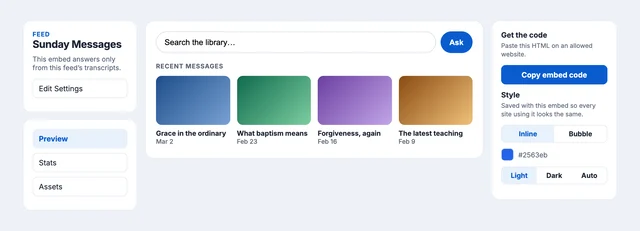
- A feed is the library. Each embed answers only from the feed you attach to it, so the feed decides which videos that widget can use. AI Discover on that feed is what makes the media searchable — it's the automatic step that transcribes and analyzes your videos, and it needs to finish before Curator can find anything in them.
- An embed is the widget. Each embed has its own feed, look, and answer settings. You can add more later — different content, different voice, different site placement.
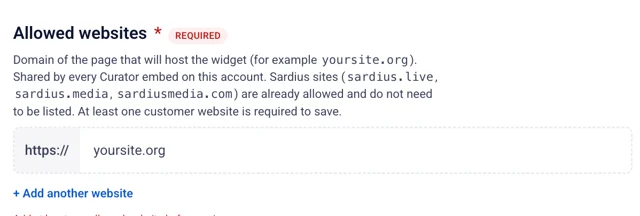
- A website allowlist is the lock. The widget loads only on domains you list. Sardius sites are already allowed. You can add your own websites during setup or later under Embeds → Account defaults — the widget won't load on your site until it's listed.
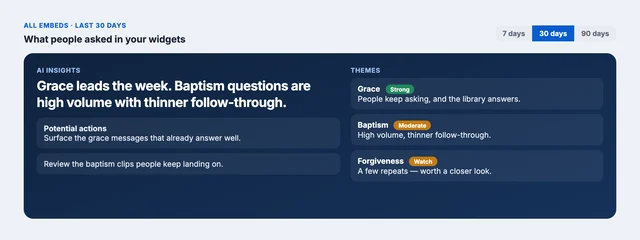
- Insights is your report. Once people start asking, Insights shows what they asked, how often your library had a good answer, and what to teach or clip next. Empty charts just mean nobody has asked yet. See Curator Insights.
Ready to set one up?
Continue to Create a Curator Embed to pick a feed, set up your allowed websites, and get the code onto your site.
Did this answer your question?
One click tells us which pages to fix first.