
Clipping Tool
Release 1.55.5 replaces the Clipping Tool with a completely rebuilt editor that addresses long-standing pain points and introduces a set of modern, precision-focused, and social-ready capabilities.
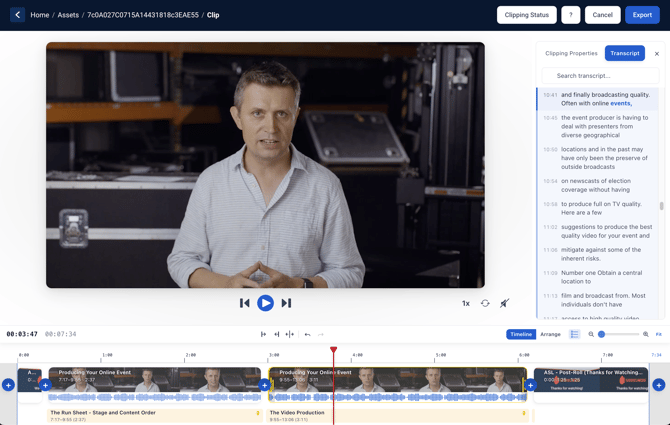
Here's just a few of the many updates:
- New Interface - A full-screen editor allows you to visually see what you're clipping and allows you to preview the result in real time.
- Accuracy Improvements - Clipping accuracy has been vastly improved, eliminating guesswork at the beginning and ending of your clips.
- Transcription Navigation - If a transcript is available, use it to find exactly what you're looking for. Synchronized playback is available throughout the clipping process.
- Split Clips - You can now remove media from the middle or elsewhere within the clip in addition to trimming out the start and end.
- Cue Point Integration - Want to just clip out a certain Cue Point? You can do just that!
- Multiple Pre/Post Bumpers - Bumpers were previously only available for MP4s. This has been extended to include HLS assets. You can also add bumpers in between edits.
- Multiple Timeline Types - Combining short and long pieces and having trouble keeping track of them on the timeline? Use the "Arrange" view to move pieces around.
- Revamped Export Process - See all clips in the queue, clear out what's done, and open your saved clips, all without leaving the Clipping Tool interface.
To learn more about the Clipping Tool updates, click here.
Device Diagnostics
Users with Makito X, Makito X4, and Sardius EMLA Encoders now have a new wealth of information available at their fingertips to help diagnose encoder health and operational status at any time. Each of these Device types now has a Diagnostics tab on the main window. Data refreshes every 15 seconds.
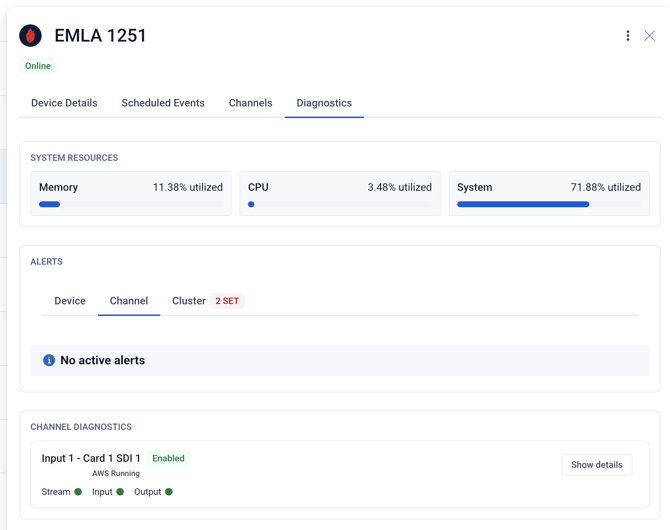
For Makito X and X4s, you'll see System Health and Resources, what Video/Audio Encoders are in use, and more.
For Sardius EMLA Encoders, you'll see System Health and Resources, Encoder Errors, and Stream Health and Errors for existing live streams.
To learn more about diagnostics for a Sardius EMLA Encoder, click here.
To learn more about diagnostics for a Makito, click here.
Linked Media Visibility
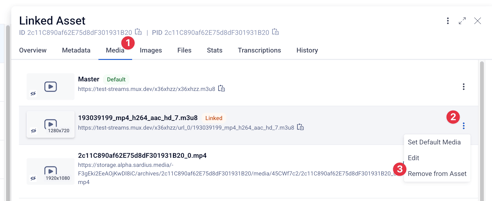
Users can now view and remove linked media directly from the Asset's Media tab.
Warning Modals for Metadata Updates
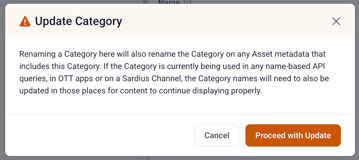
A warning modal now appears when users rename key Metadata cornerstones such as Categories, Albums, and Series. This modal explains that renaming the field could require additional updates to workflows relying on API queries, Sardius Channels, OTT Apps, Feeds, and more.
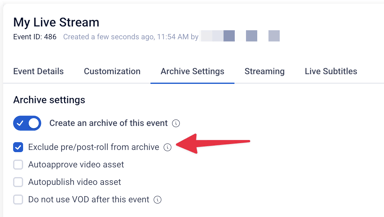
Exclude Pre/Post Roll from Entrypoint Archives
We now provide the option to exclude pre/post roll content from your livestream archive if that livestream was using Sardius Entrypoint. This can eliminate the need for complex clipping or post-production workflows, or even speed up your archival process for your online viewers.
Questions about any of these features? Reach out to your Sardius Account Manager, or you can request a demo by clicking here.