
The Device Diagnostics dashboard supplies multiple status reports and updates for your paired Makito X4 Encoder. Much of this information is available directly in the Makito X4 Encoder's Web Interface, but being able to glance at critical information can help you troubleshoot or verify performance before needing to log into your encoder.
Access Diagnostics
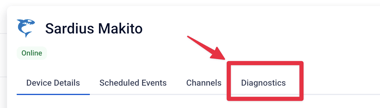
To access the Diagnostics, click on the Diagnostics Tab for the device you wish to view.
Encoders
The Makito X4 Encoder contains multiple video and audio encoders. These allow for variable or specific configurations to multiple sources using a single input. A single channel encoder will have 4 video encoders. A quad-channel encoder will have 8 video encoders.
As more encoders are enabled on the unit, the more system resources will be utilized. The Makito can not use more than 100% of its encoding resources, and should it get too high, it will not allow other services to start until conflicts are resolved.
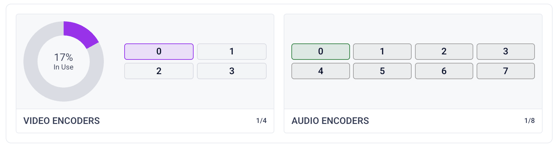
NOTE: If you need to disable/turn off a Video or Audio Encoder, you will need to log into the Makito's Web UI. You can do this from a computer on the same network as the Makito, and by clicking on the IP address in the Device Details page.
System Resources
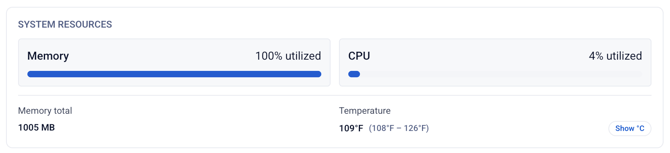
This section will contain vital statistics on the unit's CPU, Memory, and Temperature.
Network Interfaces
This section will show you what network interfaces are in use by the unit, as well as their IP address, MAC address, and IP Family.
Stream and Encoder Details
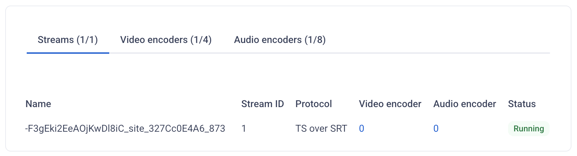
This section has three tabs, allowing you to see all of the elements of a Makito connection, which are Streams, Video Encoders, and Audio Encoders.
Streams
Here you will see details regarding each Stream active or inactive on the encoder. This will include information such as Stream/Output Name, Protocol, Video Encoder ID, Audio Encoder ID, and its status.
Video Encoders
You will see one row for each of the Video Encoders available on the Makito. Details include Encoder Name, Codec, Bitrate, Video Input, Stream(s) the encoder is assigned to, and status.
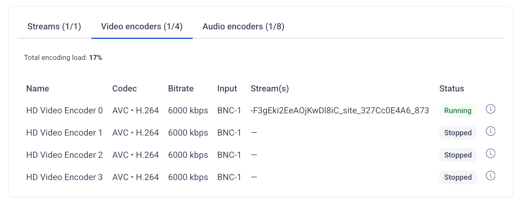
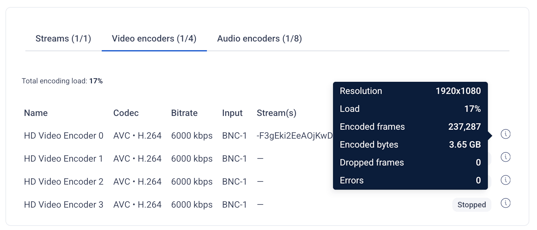
To the far right, you will see an info tooltip which will show additional information, including any errors and dropped frames.
Audio Encoders
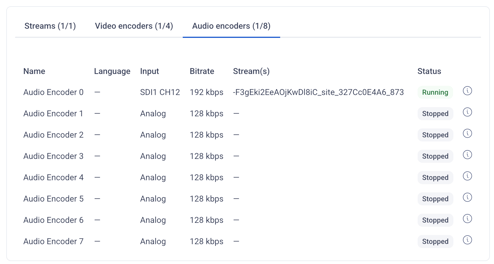
You will see one row for each of the Video Encoders available on the Makito. Details include Encoder Name, Language assigned (if applicable), Input, Bitrate, Stream(s) the encoder is assigned to, and status. To the far right, you will see an info tooltip which will show additional information, including any errors.
NOTE: If you have any questions regarding the Makito's diagnostics, please contact Sardius Support.