
Overlays Locations and Best Image Sizes
Updated
You have the option to pick a location to show overlays. Overlays can appear in various places on the player. Below is a grid of where they would appear
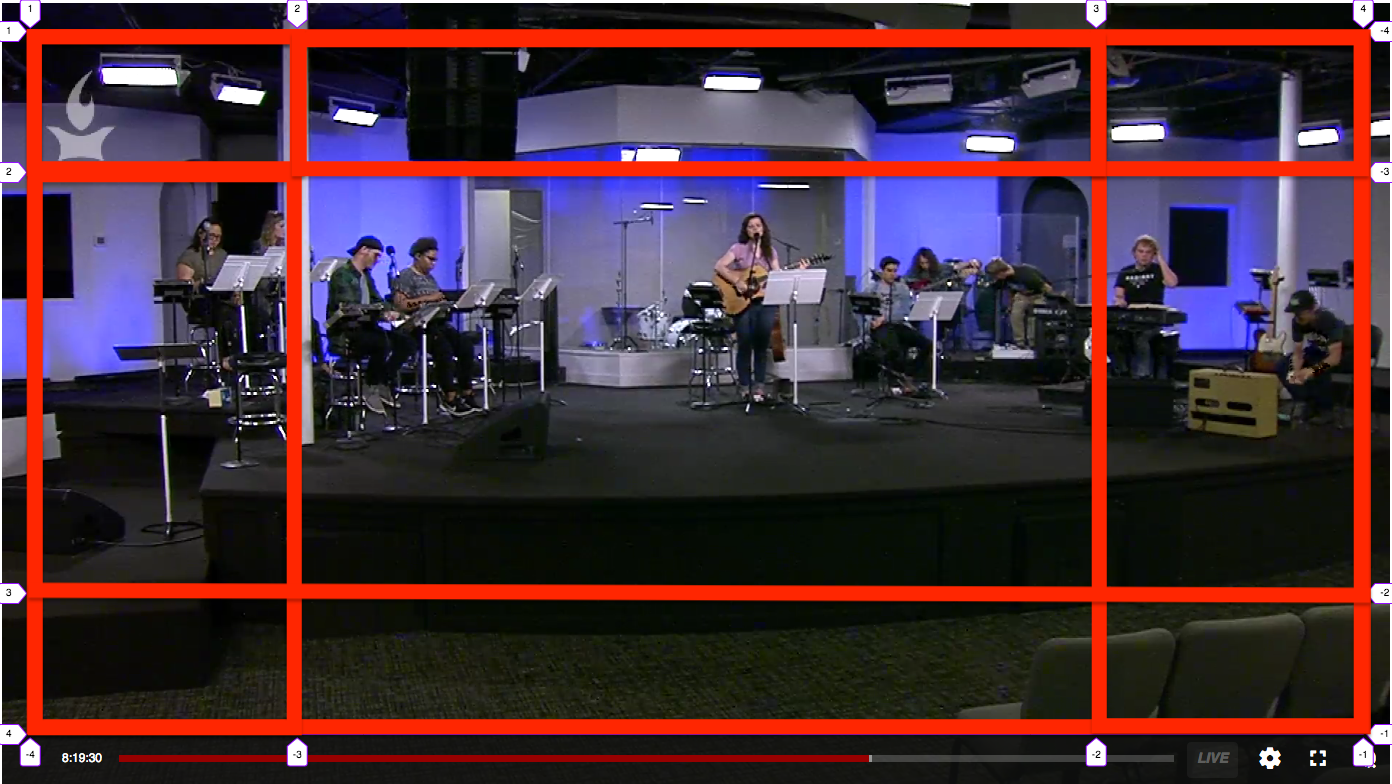
Overlay Locations at a Glance
The table below shows each overlay position, where it lands on the player, a common example of what you might put there, and the recommended max-fill dimensions.
| Location | Where It Appears on the Player | Example Use | Max-Fill Dimensions (W:H) |
|---|---|---|---|
| Whole | Fills the entire player frame | Full-screen holding slide, "Service starting soon" graphic, sponsor takeover | 628:305 |
| Lower Third | Horizontal band across the bottom | Speaker name/title, sermon title, scripture reference, event branding | 628:61 |
| Top Left | Upper-left corner | Station/ministry logo bug, campus name | 126:61 |
| Top Center | Top edge, centered | "LIVE" badge, small headline banner | 36:61 |
| Top Right | Upper-right corner | Secondary logo, language/ASL indicator | 126:61 |
| Middle Left | Center-left edge | Vertical call-to-action, QR code to give/connect | 126:183 |
| Middle Center | Dead center of the player | Prompts, "Tap to interact" cards, mid-roll announcements | 376:183 |
| Middle Right | Center-right edge | QR code, next-steps card, giving prompt | 126:183 |
| Bottom Left | Lower-left corner | Social handle, hashtag, small watermark | 126:61 |
| Bottom Center | Bottom edge, centered | Giving/donate button, "Text to give" prompt, CTA | 376:61 |
| Bottom Right | Lower-right corner | Sponsor logo, timestamp, small watermark | 126:61 |
Example uses are suggestions only — any overlay can go in any position.
Recommended Dimensions for Max-Fill
- Whole: 628:305
- Lower Third: 628:61
- Top Left: 126:61
- Top Center: 36:61
- Top Right: 126:61
- Middle Left: 126:183
- Middle Center: 376:183
- Middle Right: 126:183
- Bottom Left: 126:61
- Bottom Center: 376:61
- Bottom Right: 126:61