
Sardius EMLA Encoder Improvements
Two new AI-powered features have arrived for Sardius EMLA Encoders!
First up, Smart Cropping will take your live horizontal content and crop it for vertical streaming outputs such as TikTok and Instagram. AI will monitor your input, track the action and then vertically crop and pan as your broadcast continues.
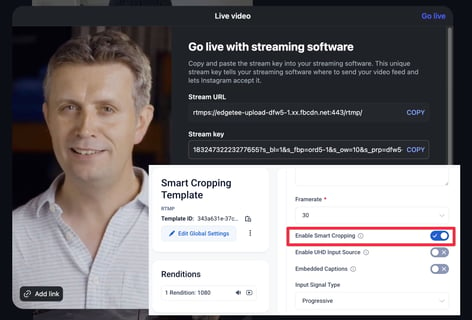
Next, Smart Captions brings AI-generated English subtitles to Sardius Entrypoint. Captions can either be synced with the video or treated as true live captions, appearing a few seconds after spoken. A profanity filter is also available, which can censor or drop offensive words, or not filter it at all.
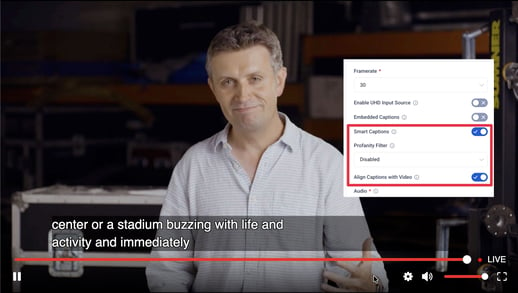
Both features are enabled inside of Templates.
To learn more about enabling these features, click here.
NOTE: Speak with your account manager to learn how you can utilize Smart Cropping and Smart Captions on your next stream.
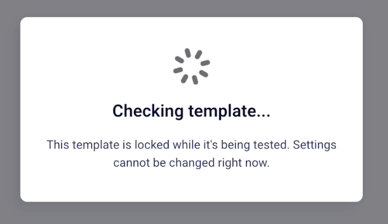
Before you go live, you can now put your EMLA templates to the test. A new Test Template button validates your template's settings before a stream ever starts, letting you catch configuration issues ahead of time instead of discovering them mid-broadcast. While a test is running, the template is locked from editing to keep the results accurate.
Sardius EMLA Encoders now support versioning. This feature is account-wide and locked to the latest stable version by the Support Team. If you would prefer using an older version, please contact Sardius Support for more information.
NOTE: Using an older version may restrict you from using newer features, including Smart Cropping and Smart Captions.
Live Event Manager
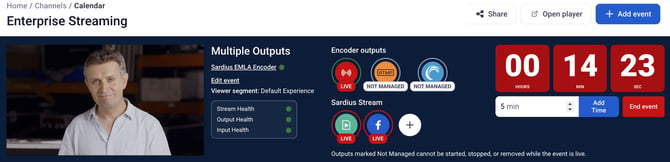
The Live Event Manager now shows you all outputs in use for your event, and not just for Sardius Stream. Users who are streaming to Sardius Entrypoint or using other outputs configured directly off the encoder will now see information about those outputs in the Live Event Manager while the stream is live. And, if there was an error with an output prior to the stream start, information about that error will be shared here as well.
RTMP and RTMPS
By popular demand, Sardius Stream now supports true RTMP connections. This extends support to additional PTZ Cameras and manual encoder setups. This is notated in our stream stepper as Manual RTMP.
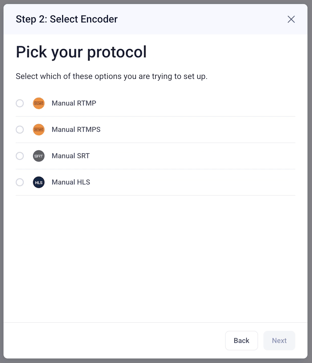
Our original RTMP setup is now known as Manual RTMPS. Any client using the legacy Manual RTMP setup before today will not need to make any adjustments and will continue to function as normal.
This update also allows clients with Makito X encoders to use those devices on any channel, old or new, without requesting special provisioning through Sardius Support.
To learn more about how to set up Sardius Stream with a manual encoder, click here.
Transcoding
Terms like publish or publishing have been replaced with a more familiar term: Transcoding.
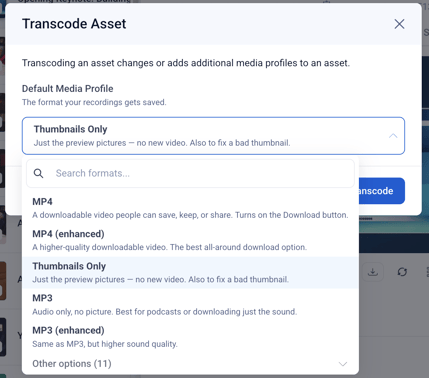
Transcoding is used when you upload an asset and create an HLS Media Profile for web-based playback, or when generating an MP4 from your live stream when it is archived.
When you review your assets, you will see the relevant media profiles that have been generated by transcoding. And, when you are ready to transcode your asset, we now provide an explanation of what each media profile will create.
To learn more about Transcoding, click here.
Other Updates
- Calendar Timezones — The timezone shown when creating an event now matches the look of the timezone shown when editing one, removing a source of confusion when scheduling.
- Sardius Stream Template Resolutions — Sardius Stream templates are now limited to supported HD resolutions, preventing invalid configurations.
- Caption File Removal — Fixed an issue where certain custom user roles received a network error when trying to remove a caption (VTT) file from an asset.
- Channel List Filters — Unchecking a filter on the Channel List now correctly resets the list, matching the behavior of the Clear button.
Questions about any of these features? Reach out to your Sardius Account Manager, or you can request a demo by clicking here.