
New Features
Cue Points (Chapter Markers)
Release 1.55 introduces Cue Points, a new chapter marker system that gives content editors precise control over dividing a VOD asset into labeled and easy-to-navigate sections, much like chapters in a book or YouTube video. Once published, these cue points appear on the scrub bar of the Sardius Player, allowing viewers to quickly jump to designated sections of the video.
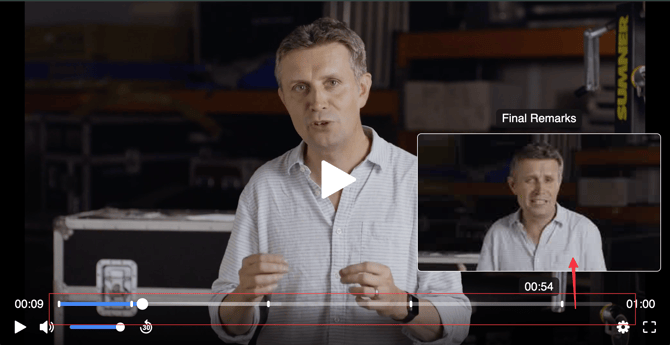
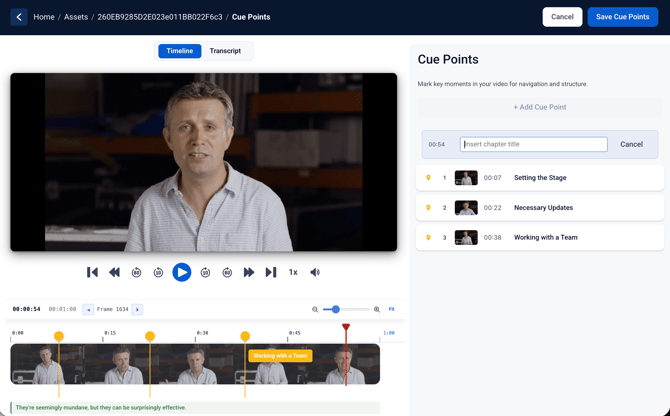
Editors can manually add, edit, or remove Cue Points using our new Cue Points Editor which features a visual timeline, audio waveform, and transcript if a VTT Subtitle file is available with the asset.
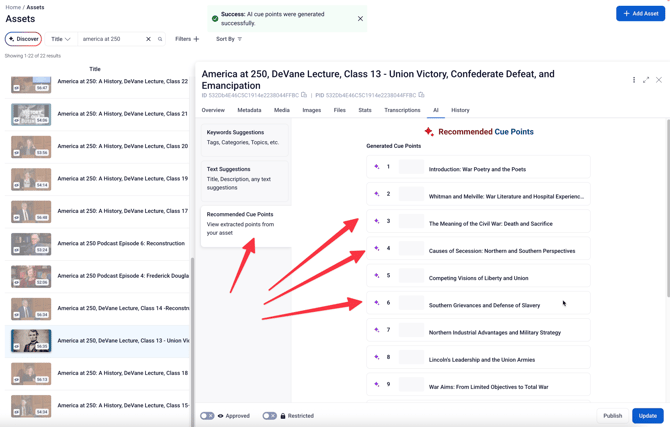
Clients using Sardius AI Discover can also automatically create Cue Points. These AI-generated suggestions can either be automatically applied to the asset, or can be reviewed and adjusted by you before being approved to appear in the player.
To learn more about Cue Points and how to use them, click here.
NOTE: Sardius AI Discover is a premium feature. To learn more, contact your Sardius Account Manager.
Timezone Updates
You can now declare the native timezone for a calendar event. For example, if you are in the Central Timezone and need to schedule an event that needs to be correctly matched to a time in the Eastern Timezone, you can make that change when creating or editing an event.
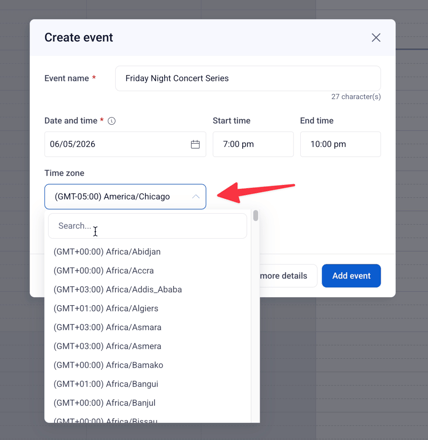
To learn more about how to change the timezone for an event, click here.
Expanding Our Native OTT Apps
This release expands our suite of native OTT apps to include Android TV, LG, and Samsung platforms. Our OTT suite also includes Roku, Apple TV, and Amazon Fire, all of which work in harmony with our Collection Video On Demand Experience.
Questions about any of these features? Reach out to your Sardius Account Manager, or you can request a demo by clicking here.