
New Features
Announcing TV Everywhere in Sardius Media Platform
We are excited to announce that TV Everywhere is ready for Sardius OTT apps and Collection watch pages. The idea is simple. A viewer starts an episode on the web during their lunch break, opens the TV app at home that evening, and the video picks up exactly where they left it. What gets saved on one device shows up on the next. No more searching for the right title or scrubbing to the right minute. Authentication is the one prerequisite. Viewers have to be logged in for any of this to carry across devices, which is why TV Everywhere sits inside the broader VOD strategy Sardius has been building with clients over the past few years.
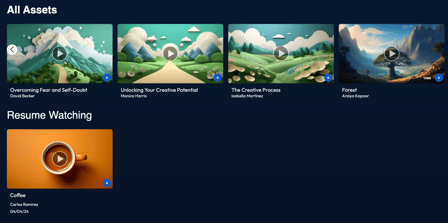
For clients already running a Sardius TV app alongside Collection, this is a quiet but meaningful upgrade. Viewers get a more connected experience without anyone needing to do anything new on the back end. For clients who haven’t yet built out the full app and Collection setup, this is a good moment to revisit what that looks like together. A TV app and a Collection layout are designed to work as one VOD experience, and TV Everywhere is what holds that experience together across screens. Anyone wanting to talk through authentication, watchlists, or VOD strategy more broadly should reach out to their Sardius Client Success Manager. The team is happy to walk through what this could look like for a specific audience and a specific catalog.
Note: If you are interested in more information or a Demo, please contact your Client Success Manager.
Revamped Download Experience for Collection Layouts
You can now control how downloadable content is displayed with an individual asset in Collection. Simply apply the correct tags to your downloadable content, adjust naming conventions, and enable those specific tags on your layout. This makes it easy to distinguish Speaker Notes from Transcripts to special PDFs and more.
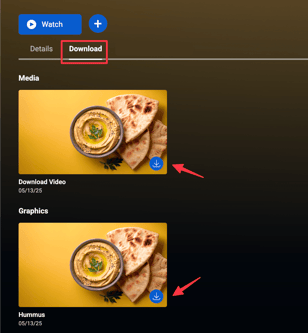
To learn more about how to enable downloads on your Collection layout, click here.
Other Improvements
Improved Category Selection Experience
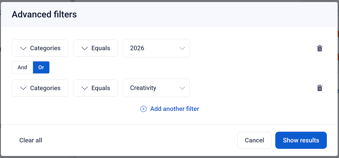
It is now easier than ever to select categories when adjusting a Smart Playlist in a feed. When editing your feed's Smart Playlist, select "Category" from the available options, and then the Category you are looking for. If you need additional categories, simply add "AND" or "OR" to adjust the feed.
Updated date range picker
The date picker across the Control Panel — including Calendars, Assets, Player Analytics, and Feeds & Metadata — now supports easy navigation across multiple years.
Faster Channels page
Player files and thumbnail images on the Channels page are now lazy-loaded along with the Channel Cards, meaning the page loads faster and uses less bandwidth on your initial visit.
Additional Improvements
There are many other quality-of-life updates "under the hood" to help our system run smoother, cleaner, and more effective. These updates also helped us streamline a few processes, and continue staging for some major updates coming in the next few releases.Questions about any of these features? Reach out to your Sardius Client Success Manager — we're happy to help!