
Stream Stepper
When we first introduced the Stream Stepper in 2023, it allowed users to create robust streaming configurations that would send the same system to multiple destinations such as the Sardius Player, Facebook, and YouTube.
Today, the Stream Stepper is getting a massive upgrade! Each of our paired encoders now supports a variety of output types to multiple destinations using different templates. And, for the first time ever, we now support multiple streaming services inside one channel.
The first change is a visual one. Traditionally, we laid out the configuration left-to-right, or source-to-outputs. The configuration is now laid out top-to-bottom, which allows us to better see and manage the setup.
A Makito X4, for example, could send SRT to Sardius Stream with a bitrate friendly to Facebook and YouTube, and also send a higher-quality stream to a Makito Decoder in a different facility. 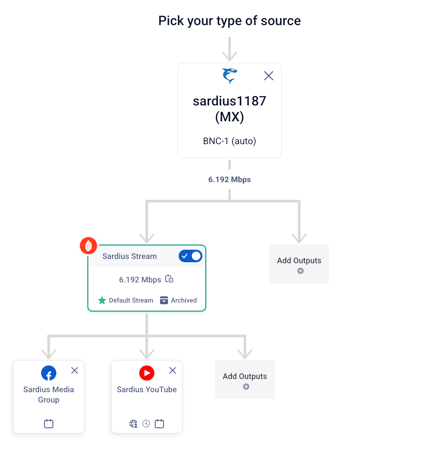
Or, a Sardius EMLA Encoder could send a UHD stream to the Sardius Player using Entrypoint, HD to Facebook and YouTube through Sardius Stream, and custom RTMP configurations to Rumble and Instagram.
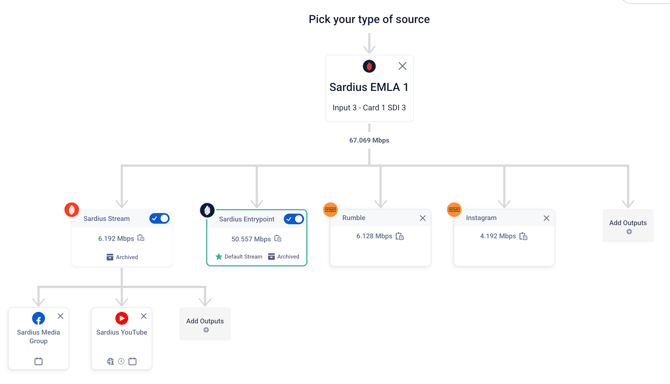
Manual stream configurations are still supported, so those using software encoders like vMix and OBS, or other hardware like PTZ Cameras or BMD encoders, can still enjoy the same simplified setups.
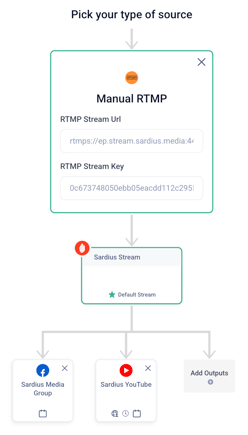
You'll notice one output highlighted in green. This is your Default Channel Stream. It's the source that feeds your Sardius web player, and every stream configuration requires one.
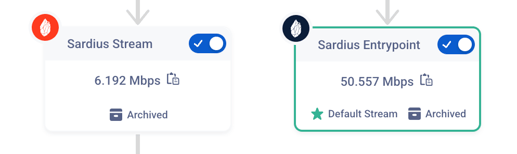
If none is selected, you'll see a helpful notification prompting you to choose. To set an output as the default simply click it and select 'Make this my default live stream.'
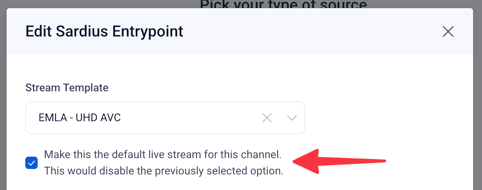
These changes are very exciting, and are now available for any channel using a paired Makito, Elemental Live, and Sardius EMLA Encoder.
To learn more about our upgrades, and how to get the best performance and features from the new stream stepper, please review our newly updated Onboarding Video Series. Look for the videos with NEW in the title.
New Templates
To support the changes to the new stream stepper, we are introducing RTMP and SRT templates!
You can duplicate our existing default templates and make minute adjustments based on your selected device. Or you can build new templates entirely from scratch.
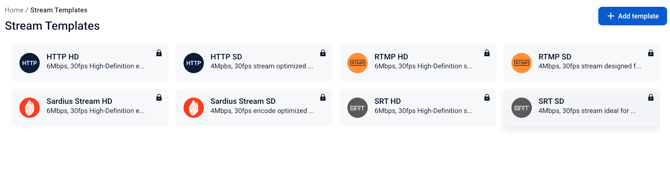
To learn more about Templates, please click here.
Encoder Offline Notifications
Has this happened to you? You get everything ready for your live stream, and your web player goes live and you see the dreaded words "Stream Offline" in the player? And then you go look in the Sardius Channel and that's when you find out you forgot to turn on your encoder?
Wouldn't it have been great for someone to have reminded you to turn on your encoder?
Sardius is here to help! One hour before your event is scheduled to start, we'll check for you to see if your encoder is online. If it isn't, we'll send you an email notification!
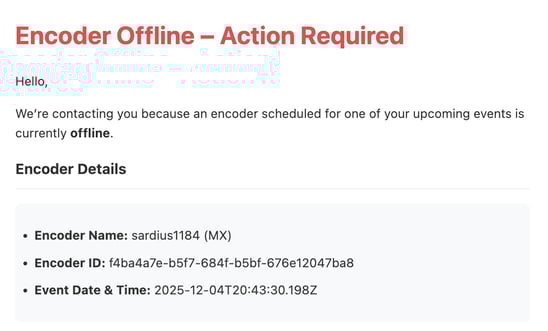
To receive these notifications, reach out to your Client Success Manager or Sardius Support and we'll be happy to enable those notifications for you.
Notes on Haivision Hardware (Makitos and Kulabytes)
Clients who have been using the Haivision Kulabyte (KB4, KB Mini, etc.) were informed last year that automation support for these encoders would be ending due to changes within the Haivision Management Service. As of today, January 26, 2026, automation options are no longer available for KB encoders.
KB Encoders can still be used with Sardius, but they will have to operate in a "manual" mode. Here are two articles (with a video tutorial) to help you set up your encoder moving forward:
Clients using Makito X or Makito X4 Encoders will soon receive updates from your account manager about updates to your encoder in order to interface with the new management service.
If you have questions about any of these updates, or would like to request a demo of a feature, please reach out to your Sardius Client Success Manager.