---
title: "Locate Log Files for an Elemental Event"
url: "https://support.sardius.media/knowledge-base/locate-log-files-for-an-elemental-event"
category: "Elemental"
updated: 2026-10-30
summary: "The Elemental collects different types of logs to record events and actions that are taken throughout the server. When troubleshooting streaming issues, knowing which log to look for can aid our support team in locating the incident within the logs and determine possible causes and theories. Stage…"
---
# Locate Log Files for an Elemental Event
The Elemental collects different types of logs to record events and actions that are taken throughout the server.
When troubleshooting streaming issues, knowing which log to look for can aid our support team in locating the incident within the logs and determine possible causes and theories.
| **Stage** | **Log Name** | **What it Tracks** |
| ----------------------------------------------------------------------------------- | ------------------- | ---------------------------- |
| Input (SDI) | ingester.log | Input Data Log (SDI Inputs) |
| Input (RTMP) | rtmp.log | Input Data Log (RTMP Inputs) |
| Decode | _DateTime_\_eme.log | |
| Elemental Media Endline (EME) is a collection of essential services and processes. | | |
- Event Startup
- Services used
- Audio
- Timecode
- Other details about the video except for the encode process
**Decode**
_DateTime_\_emecmd.xml
Contains the settings used by the EME to run the event
**Encode**
_DateTime_\_eme_ve.log
VE stands for Video Engine, and details information about the encoding |
**Package**
upload.csv
Contains information about certain types of outputs
**System**
Production.log
Errors in the Elemental UI itself
**System**
live_runner.output
Information from the Elemental’s Live Runner, which handles the management, distribution, and running of events in the Elemental
**System**
live_runner.log
Highlights critical errors reported by the Live Runner
**_DateTime_ will always be replaced by the Date and Time the Event was running. Each EME log will also contain an Event ID so you can easily match up the right log to the right event.**
> **Note:** _**Note:**_ The most common logs that Sardius Support will find issues in will be the _DateTime_ logs.
#### **Viewing and Downloading Logs**
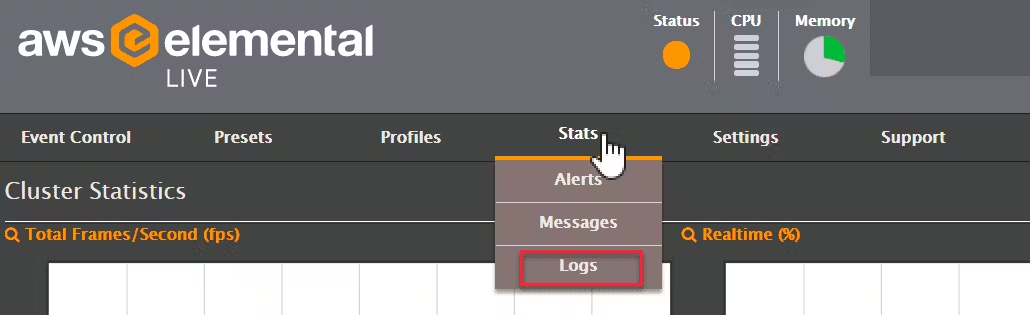
Logs can be viewed and downloaded within the UI.
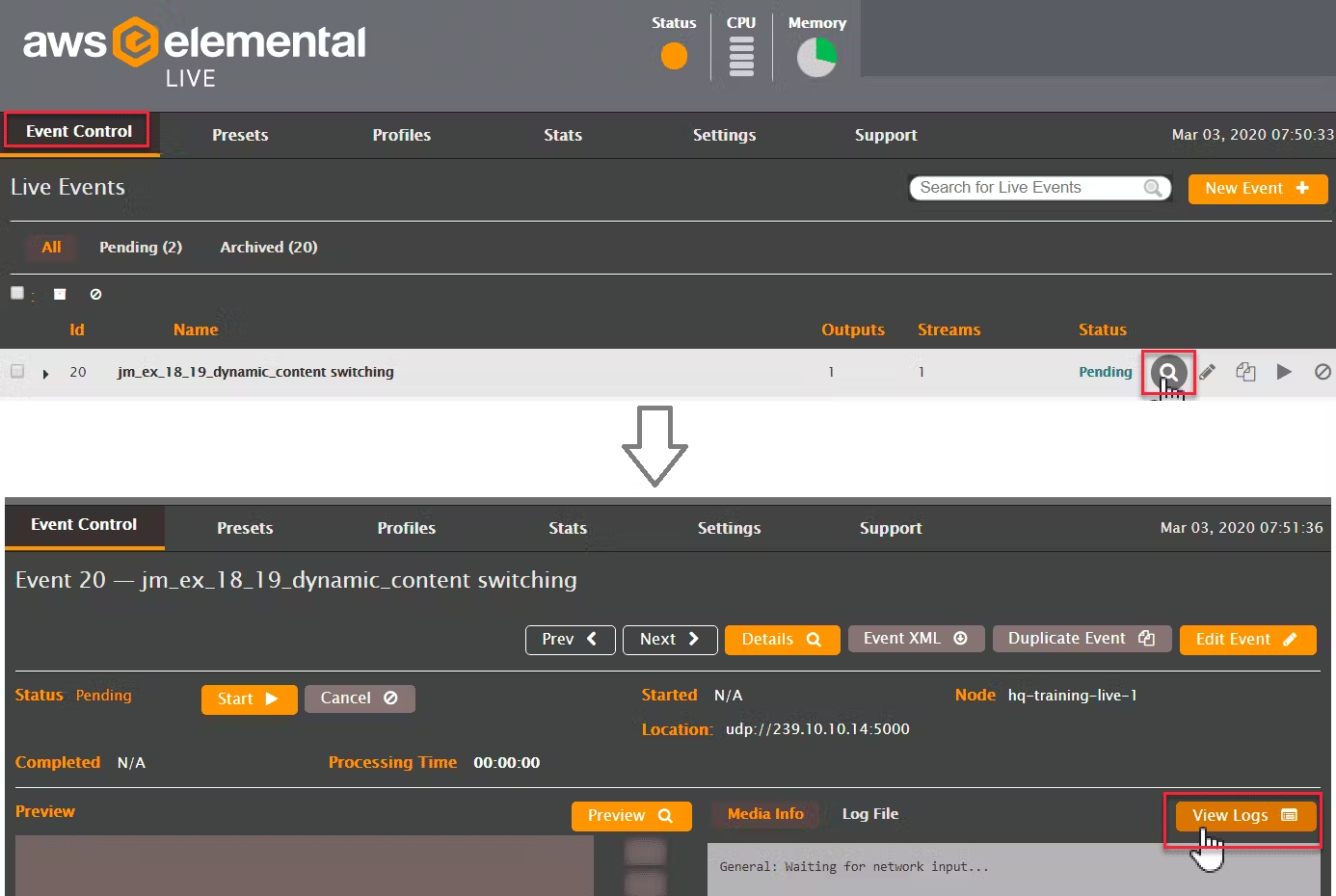
Logs can also be accessed directly from the event.
Logs can be downloaded from the Elemental’s file system by accessing through the SSH command line or via SFTP (Cyberduck).
#### **Location of Log Files**
| Directory | Contents |
| ------------------------- | ---------------------------------------------------------------------------------- |
| /data/pgsql/logs | Elemental Postgres database |
| /opt/elemental_se/web/log | live_runner.output
_DateTime_\_eme.log
_DateTime_\_eme_ve.log |
| /var/log | CentOS system messages
Device driver messages
HTTP server logs
Samba logs |